Pocket WiFi at Haneda Airport – Pickup, Pricing & Best Plan
Where to Pick Up Pocket WiFi at Haneda Airport
Here's where you can find the best pocket WiFi available at Haneda airport, complete with English-language support:
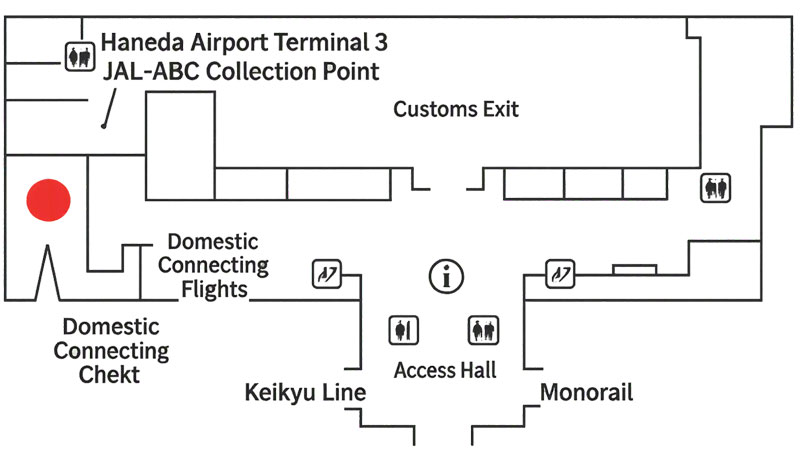
| Where to pick up | JAL ABC Arrival Counter, 2F, Haneda Airport Terminal 3 |
|---|---|
| Opening Hours | Open from 4:00 AM - 1:00 AM |
| How to get there | Head right after exiting Immigration & Baggage Reclaim and continue to the far end of the Arrival Lobby (2nd floor) in Terminal 3. |
Why pick up Pocket WiFi at Haneda Airport?
If you're arriving in Tokyo and need internet access, picking up a Pocket WiFi at Haneda Airport is a convenient option. Devices are available at kiosks in the Arrivals area, allowing you to get online quickly. Pocket WiFi offers large data plans, fast speeds, and supports multiple devices, making it useful for both individual travellers and groups.
How to pick up Pocket WiFi at Haneda Airport
1. Order in advance
Select Haneda Airport Terminal 3 JAL-ABC as your pick-up location. If you haven't ordered yet, you can still do so online for same-day pick-up.
2. Head to the Pick-Up Point
Visit the Haneda Airport Terminal 3 JAL-ABC meeting service counter in Arrivals.
3. Show your order number
Present your confirmation email.
4. Receive your device and quick-start guide
Staff will provide the Pocket WiFi and a quick-start guide.
5. Choose your plan, and get connected
Follow the guide to activate. Plans offer up to 300GB/month.
Does Haneda Airport Offer Free WiFi?
Yes — Haneda Airport offers complimentary WiFi throughout all terminals via the “HANEDA-FREE-WIFI” network. While it’s convenient for quick checks and messaging, speeds can drop during busy hours, sessions may time out, and security is limited. For a faster, more secure connection you can rely on anywhere in Japan, a Pocket WiFi pickup at Haneda is the smarter choice.
📌 Handy Japanese for Travelers
Sumimasen, poketto waifai no uketori-ba wa doko desu ka?
すみません、ポケットWi-Fiの受け取り場はどこですか?
Excuse me, where is the Pocket WiFi pickup counter?
JTB no uketori kauntā wa arimasu ka?
JAL-ABCの受け取りカウンターはありますか?
Is there a JAL-ABC pickup counter?
Eigo no sapōto wa arimasu ka?
英語のサポートはありますか?
Do you have English support?
| Arrival Gate Area | Walking Time to JAL-ABC Counter | Directions |
|---|---|---|
| Gates 109 - 114 (closest to the Arrival Exit) | 2-3 minutes | Exit your gate and follow the Immigration" signs. After clearing Immigration & Baggage Reclaim, proceed to the Arrivals area. |
| Gates 105 - 108 and 140 - 149 (farther from the Arrival Exit) | 2-3 minutes | Exit your gate and follow the "Immigration" signs. After clearing Immigration & Baggage Reclaim, proceed to the Arrivals area. |
| Late-night buses/shuttle arrivals (1st Floor) | 3-5 minutes | After getting off the bus, go to the 2nd floor. Continue to the far end of the Arrival Lobby. The JAL-ABC counter is located near the elevator/escalator area. |
Notice for Customers:
Please note that walking times from the airport gates can vary significantly and may take
up to 24 minutes, even from some of the closest gates.
The Best Pocket WiFi Options at Haneda Airport
Mobal WiFi gives you a pocket WiFi router that works perfectly wherever you go, using all of the big four networks; Softbank, DoCoMo, AU and Rakuten.
You'll get great coverage all over Japan - the device will automatically connect to whichever network has the strongest signal wherever you are.
Unlike typical rental services, Mobal offers a device that you purchase and keep, which can be especially convenient for frequent travellers.
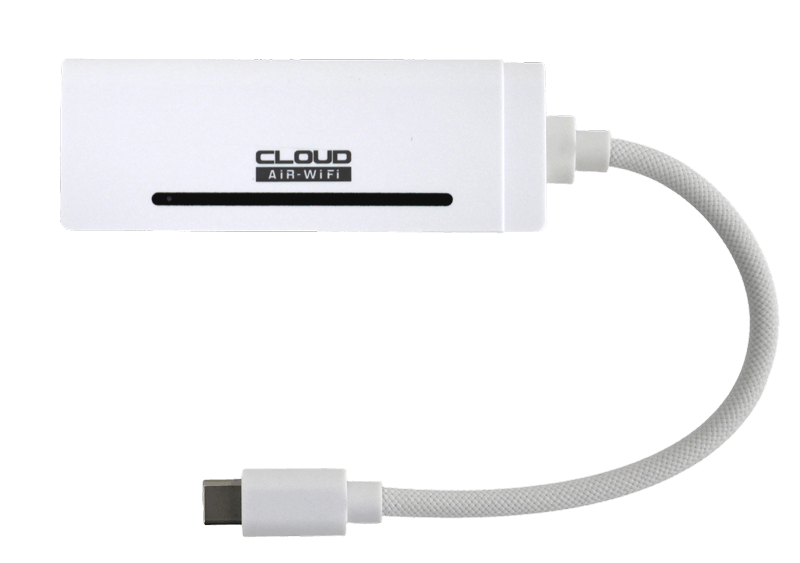
With Mobal WiFi, you can choose your perfect data plan, with up to 300GB per month available. That means you can browse to your heart's content for as little as ¥161 per day, for as long as you need it!
Pick up the best WiFi at Haneda by placing your order here!
FAQs
Mobal Japan WiFi connects to any of the big four networks in Japan; Softbank, DoCoMo, AU or Rakuten. That means that you’ll get great connectivity all over Japan! In your home, you can connect up to 10 of your devices to it, just like a traditional WiFi hotspot. Your device charges via USB, and will last for 10-12 hours of continuous use when not connected to power.
You’ll get up to 50Mbps upload speed and up to 150Mbps download speed. Perfect for streaming, connecting multiple devices, and staying in touch with home.
If you use your data allowance, speeds slow to a max of 384kbps, but won’t stop. You’ll never be stuck without an internet connection.
Your high speed data allowance will be reset on the 1st of each month. If you use more than your data allowance, your data speed will be reduced to a maximum of 384kbps until the 1st of the next month. These speeds may not be sufficient for streaming music or video, but they should be perfect for most data activities, such as web browsing, emailing, posting to Facebook, Whatsapp messaging, etc. In fact, it's great for all those things you need to do to make your friends and family at home jealous of your trip.
You’ll pick your perfect plan when you activate your device. This is a quick and easy process, and we’ll send you all the instructions you need after you place an order.
No, it's powered by USB-C, the Japan Pocket WiFi Stick can connect directly to your device, or be plugged into a power bank or outlet to provide a wireless connection.
You can connect up to 8 different devices at any one time.
No! You can end your service at any time, and easily reactivate it too. No returns needed!
No Returns Needed. You can end your service at any time, and easily reactivate it too.
Our website is both SSL secure and is regularly checked by an independent security service. We are committed to protecting your security both during ordering and for the lifetime of your service with us.